Want a quick Razer Gold balance check to make sure you have enough for your next purchase? Don't worry! We will be letting you know the simplest ways to do it in this blog. But let's first cover the basics for those of you who are new to the Razer world.
What Are Razer Gold Gift Cards?
Avid gamers must be already familiar with the Razer platform. It has become a one-stop destination for gaming enthusiasts worldwide. Razer Gold gift cards act as a virtual currency within the Razer ecosystem. It allows users to purchase games, in-game content, and even subscriptions across a wide range of platforms and services. These gift cards are a favorite among gamers who want to enhance their gaming experience.
Now that you know what Razer Gold gift cards are, let’s dive into the simplest methods to check your balance and ensure you’re always ready for your next purchase.
Razer Gold Gift Card Balance Check Using the Website
- You will start by opening the official Razer Gold website and from the top menu select Gold. Or you can directly visit this link https://gold.razer.com .
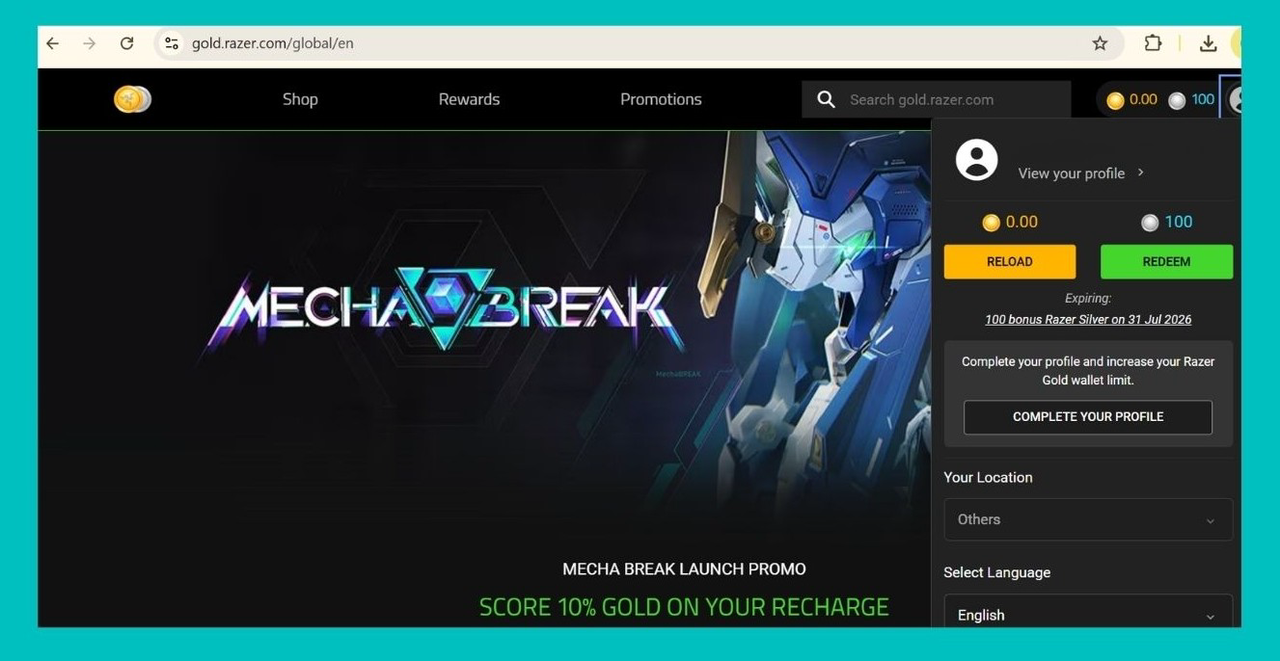
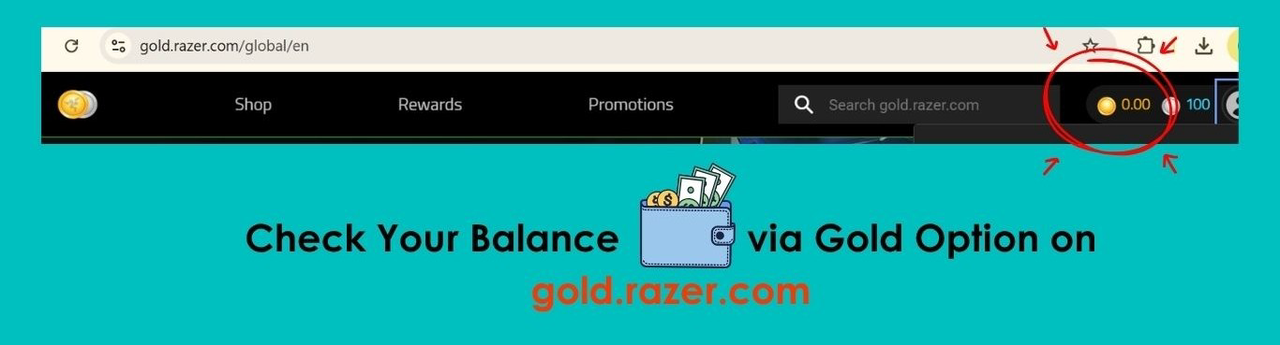
- Once there, you will have to go to the account section. You can access that on the top right hand side section of the website.
- Here, you will see your Razer gift card balance displayed on the screen.
How to Check Your Razer Gold Gift Card Balance Via the Razer App?
- Download and install the Razer Gold app from your app store, if you haven’t already.
- Log in to your Razer account or create one if you're a new user.
- Your current Razer Gold balance will be displayed on the screen.
Can You Find the Razer Gold Card Balance Through Customer Support?
Yes, absolutely you can!
Even though the above mentioned methods are quick and easy, you might want to get in touch with customer support for your Razer gold balance check. You can do so by visiting the Help section on the Razer Gold website and select Chat with Us option. An agent will reply to you shortly. Provide your gift card details to them and they will let you know your Razer card balance immediately.
Why Should You Always Check Your Razer Gift Card Balance?
Keeping track of your Razer Gold gift card balance might seem like a small task and as shared above it is done easily in seconds, but it can save you from unnecessary headaches. Here are a few reasons why it’s important:
Avoid Interruptions During Purchases
Imagine getting ready to buy your favorite game, only to find out mid-purchase that your card doesn’t have enough funds. You will be sorely disappointed, of course. By regularly checking your balance, you are always prepared and can complete your transactions smoothly.
Plan Your Spending Wisely
Knowing your balance helps you plan how to spend your Razer Gold efficiently. You will have a clear idea of what you can afford, whether it’s premium in-game items, upgrading gear, or subscribing to services .
Prevent Card Inactivity
Unused gift cards can easily be forgotten. Checking your balance reminds you to use your card before it expires or becomes inactive and ensures you get the most out of it.
Identify Potential Issues Early
If there’s an issue with your card, such as an incorrect balance or suspected unauthorized use, checking it regularly allows you to address the problem with Razer support immediately.
Everything You Need to Know About Redeeming Razer Gold Gift Cards
Now that you know three different ways for Razer Gold gift card balance check, let us explore ways of redeeming it in this section of the blog.
1. Redeeming Through the Razer Gold Website
Visit the Razer Gold official website and log in to your account.
Navigate to the “Reload” section.
Enter the PIN or code from your Razer Gold gift card and click Redeem. The funds will be added to your Razer wallet, ready to use whenever you want.
2. Redeeming on the Razer App
Open the Razer Gold app on your smartphone and log in.
Go to the “Reload” or “Top Up” section.
Enter the gift card code and follow the prompts to complete the redemption process. Your wallet balance will be updated instantly.
Things to Remember When Redeeming Your Razer Gift Card
1. Ensure the Gift Card Is Valid
2. Use the Correct Region
3. Redeem on the Official Platform Only
4. Check Your Internet Connection
5. Log in to the Correct Account
6. Enter the Code Carefully
7. Verify the Balance After Redemption
Can You Get Cash From Your Razer Gold Gift Cards?
Razer does not allow you to convert your Razer Gold gift card balance to cash directly. But, it does not mean that you cannot seLL your Razer gift card. Let us introduce you to Tbay, a gift card trading platform in Nigeria. Thousands of users who have unused Razer gift cards and want cash urgently sell their Razer cards and receive Naira using Tbay. If you have also been looking to redeem your Razer Gold gift card for cash, install Tbay Android App or Tbay iOS App today.
Why Choose Tbay to Redeem Razer Gold Gift Cards for Cash?
- Selling Razer Gold gift cards on Tbay is a safe option as it is a reputable platform in Nigeria for selling gift cards. The app has more than a million downloads and you can see glowing reviews on the Google Play Store.
- If you always want to get the best rates and don't want to undersell your Razer gift card, there is no better option than Tbay. Explore for yourself and see.
- Another reason to choose Tbay is the speed of transactions. With the Fast Transaction feature, you can trade directly with Tbay without browsing multiple vendor offers, saving time and effort.
- The app also provides secure payment options, so you never have to worry about the safety of your money. Tbay ensures every transaction is safe and reliable.
- If you ever have questions, Tbay's 24/7 customer support is always there to assist you, making your trading experience stress-free and easy.
- Now, before going ahead with selling your card, don't forget to check your Razer Gold gift card balance with one of the methods we shared above. Make sure you provide correct information so that your experience goes smoothly with Tbay.
Join us now
Email: [email protected]
Website: https://tbay.store
Facebook: Tbay
Tbay App: Google Play Store & App Store