"Is your Steam gift card not working?" You’re not the only one facing this problem. Many gamers in 2025 still struggle with errors when trying to redeem Steam gift cards. The issue could be the code won’t activate, the balance doesn’t show up, or the card gets rejected for no clear reason. These problems can be frustrating, especially when you’re excited to buy a new game or top up your Steam Wallet.
In this blog, we’ll explain the most common Steam gift card errors in 2025 and show you exactly how to fix them. Don't worry! there won't be any confusing tech jargon, just clear and step-by-step solutions to get your Steam card working fast. Let's begin!
1) Invalid Steam Code Error
The "invalid code" message is one of the most common issues Steam gift card users face. When this happens, there’s no need to panic, the solution is often straightforward.
First, carefully verify each character of the code you entered. Steam gift cards follow a 15-digit alphanumeric format and users make mistakes with similar-looking characters, such as mixing up similar characters (5 vs S, 2 vs Z). In most cases, correcting a simple typo will resolve the issue.
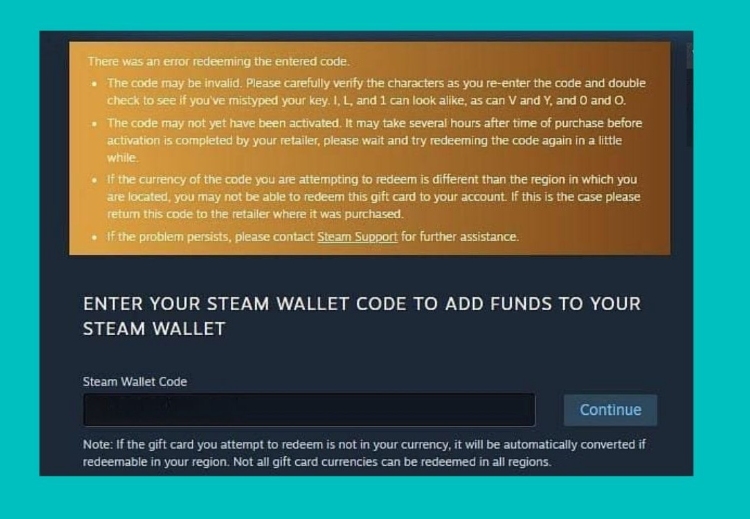
However, if the code still doesn’t work after double-checking, the problem may lie elsewhere. The card might not have been properly activated at the store, or it could have already been used. Your next step should be to contact the retailer where you purchased the card and provide your receipt for verification. If you bought the card online, reach out to the seller for assistance. By following these steps, you can quickly determine whether the issue is due to a typo, activation error, or potential fraud and get back to redeeming your Steam balance.
2) Region Mismatch
A limitation with Steam gift cards is regional restrictions. Every Steam card is locked to a specific country or currency zone. Attempting to redeem the card outside that region will trigger the error: "The gift card was purchased in a different country."
Some users try to resolve this issue by creating a new Steam account set to the card's original region, often using a VPN during activation. However, this violates Steam’s Terms of Service and may result in account suspension. We would suggest if you encounter this issue, you should sell your Steam card for cash using one of the gift card trading platforms in Nigeria like Tbay that offer fair rates and a reliable service. Once you have the cash, you can buy the Steam card that will work in your region.
3) Server Timeouts
Sometimes when you try to redeem your Steam card, you may encounter either a frozen loading screen or an error message stating the transaction couldn't be completed. This is due to server timeouts that typically occur during peak traffic periods like major sales events, when thousands of users simultaneously try to top up their wallets.
To resolve this issue, first, check Steam's server status page to confirm if the issue is on their end. If servers are operational, try switching between the Steam client and web browser. It is possible one platform may work better than the other during high traffic. One thing to avoid is repeatedly entering the same code during outages, as this might trigger fraud alerts. Instead, wait 30 minutes between attempts. If your balance doesn't update within a few hours despite successful code entry, you can contact Steam Support with your receipt and an error screenshot.
4) Zero Balance After Redemption
Sometimes even after successfully redeeming a Steam gift card, you find your wallet balance remains at zero. This problem may happen due to server synchronization delays that again occur during peak usage times. The redemption appears successful, but Steam's backend systems take extra time to process the transaction. In these cases, just wait 2-3 hours as the balance will show as systems catch up. At times, browser or client caching problems can prevent proper balance updates. You can try manually clearing the cache through Steam's settings that will force the system to fetch your current balance from the servers.
If after all this, you still don't see the updated Steam card balance, you can reach out to Steam Support and provide the original purchase receipt, screenshot of the redemption confirmation and exact time/date of redemption attempt. Most cases resolve within 24 hours, but having proper documentation ensures fastest resolution.
5) "Card Already Redeemed" Error
Seeing the "This gift card has already been redeemed" message is the most frustrating situation, especially when you're certain you haven't used the card before. This error typically occurs when the Steam system recognizes that the gift card code you're trying to redeem has already been activated by another user or on another account.
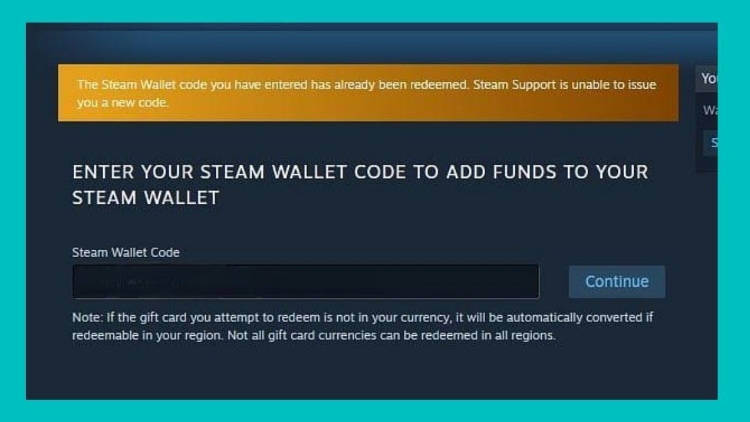
To address this issue, start by carefully reviewing your Steam account's redemption history to confirm whether you might have previously used this card. If you're certain the code should be valid, your next step depends on how you obtained the card. For physical cards, you can examine the scratch-off area for tampering marks. Return to the store with your receipt, they can check activation records. For digital codes, contact the seller immediately for proof it was unused. If you bought your Steam card from a reputable source, you'll likely get a replacement. Third-party purchases may require opening a dispute.
Conclusion:
Steam card errors don't have to ruin your gaming plans. Each problem we've covered has specific fixes. The biggest takeaway is to act quickly while staying calm. Also, remember to keep purchase receipts until you have successfully redeemed your Steam gift card. You never know when you might need it. Another suggestion would be to redeem cards immediately after buying and stick to authorized sellers only. We hope you will longer worry more when your Steam gift card is not working. Read the blog and follow the steps outlined to resolve the issue in no time.
If it isn't the Steam card errors you are concerened about, but you have an unused card lying around we have the solution for that too. You can sell your Steam cards on Tbay, the best gift card trading app in Nigeria. Convert your Steam card to cash and use it wherever you want.
Related Articles
https://blog.tbay.store/industry-news/easiest-ways-to-check-your-steam-gift-card-balance.html
https://blog.tbay.store/trading-guides/how-much-is-200-steam-card-to-naira-on-tbay-currently.html
https://blog.tbay.store/trading-guides/how-much-is-steam-card-100-to-naira--in-2025-on-tbay.html
Join us now
Email: [email protected]
Website: https://tbay.store
Facebook: Tbay
Tbay App: Google Play Store & App Store