We’ve all been there, you're chatting with friends, streaming your favorite show, or browsing the web, and suddenly... buffering. A dreaded notification pops up: "You’re running low on data!"It always seems to happen at the worst time, right?
But don’t worry! If you're a Glo user, you can always borrow data from Glo. Thanks to Glo’s Borrow Me Data service, you don’t have to hit pause on your fun and continue browsing without any interruptions.
In this blog, we’ll share with you how to borrow data on Glo, the eligibility requirements and everything else you need to know. So, let us start!
How Do You Become Eligible for Glo Borrow Me Data Service?
Glo Borrow Me Data service is a lifesaver when your data runs out but only if you're eligible. Here's everything you need to qualify to borrow data from Glo:
1. Active Glo SIM for at Least 3 Months
You must have been using your Glo SIM regularly and consistently for at least three months. This timeline shows Glo that you're a reliable and responsible user
2. Regular Data Usage History
Glo evaluates your usage patterns. You’ll typically need a consistent monthly data purchase or usage history, demonstrating that you actively use the service .
3. No Outstanding Borrowed Data or Airtime
If you’ve previously borrowed and haven't repaid, you'll need to clear that balance before borrowing again
Quick & Easy Methods to Borrow Data From Glo in Nigeria
1) Use USSD Code to Borrow Data on Glo
This is the fastest and most popular method, especially if you don’t have internet access at the moment. Here’s how to do it:
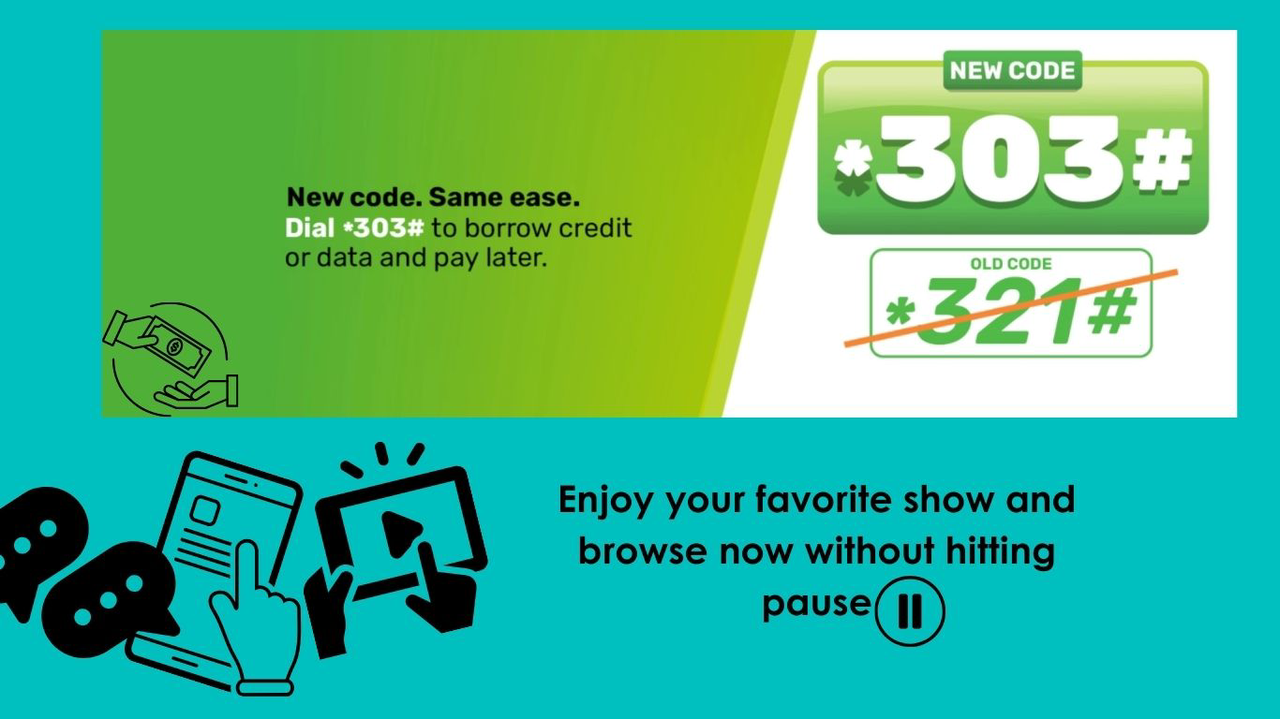
- Dial *303# from your phone which is the code to borrow data from Glo.
- From the menu that appears, select "Borrow Data."
- You’ll be shown a list of available data plans you qualify for (like 350MB, 1.6GB, 3.2GB, etc.), along with their costs.
- Choose the data package that suits your needs.
- Confirm your selection, and the data will be credited instantly.
2) Use Glo Cafe App to Borrow Data
If you already have the Glo Café app on your phone, borrowing data is quick and easy, with no need to rely on USSD codes. Here's how to do it:
- Open the Glo Café app and sign in using your Glo number.
- Navigate to the main menu (often under “Discover” or "Show All") and tap “Borrow Me”.
- Choose “Data” from the options presented.
- A list of data packages you’re eligible for will appear depending on your usage and eligibility
- Select the plan you need and tap "Subscribe" or "Confirm".
- Within seconds, the borrowed data is credited to your account and a confirmation message will appear.
Important Things to Remember When Borrowing Data from Glo
1. A 15% Service Fee Applies
When you borrow data on Glo, a 15% service charge is automatically added to the cost. For example, if you borrow ₦100 worth of data, you’ll owe ₦115 in total when you next recharge. It’s a small fee for the convenience, but it’s good to be aware.
2. Repayment Is Automatic
The amount you borrow (plus the 15% fee) will be deducted from your next recharge automatically. So if you recharge ₦500 after borrowing, the borrowed amount will be subtracted immediately before you can use the rest of your airtime or buy new data.
3. Some Plans Include Night Bonuses
Certain Glo Borrow Me Data packages come with a night data bonus, which can only be used between 12:00 AM and 5:00 AM. Make sure to check the breakdown before selecting a plan so you know when to use each portion of your data.
4. You Can’t Borrow Again If You Haven’t Repaid
If you’ve borrowed data and haven’t repaid it yet, you won’t be allowed to borrow again until that balance is cleared. Always top up your airtime if you plan to use the service frequently.
5. Borrowing Limits Are Based on Usage
The amount of data you’re allowed to borrow depends on your monthly usage and recharge history. The more frequently you use and recharge your line, the higher the packages you’ll be eligible for.
6. You Can’t Transfer Borrowed Data
Data borrowed through the Glo Borrow Me service cannot be shared or transferred to other users. It’s strictly for the line that borrowed it.
FAQs
1. How can I borrow data from Glo?
You can borrow data by dialing *303# or using the Glo Café app. Choose "Borrow Data" and select from the available plans based on your eligibility.
2. What is the code to borrow data from Glo?
The USSD code to borrow data is *303#. Just dial it on your Glo line and follow the prompts.
3. How much data can I borrow on Glo?
It depends on your usage and recharge history. You may be eligible to borrow anywhere from 125MB to over 10GB.
4. Is there a fee for borrowing data from Glo?
Yes, Glo charges a 15% service fee on all borrowed data. This fee is added to the total amount to be repaid.
5. When do I repay the borrowed data?
Repayment is automatic and deducted from your next airtime recharge. Make sure to recharge enough to cover the borrowed amount plus the fee.
6. Can I borrow data if I haven’t paid back the previous one?
No, you must repay the previous borrowed data from Glo before you can use the service again.
7. Can I share or transfer borrowed data to someone else?
No, borrowed data cannot be shared or transferred. It is only usable on the line that requested it.
Conclusion:
Running out of data is never fun, but thankfully, Glo gives you a quick way to stay connected with its Borrow Me Data service. Whether you choose to borrow through *303# or use the Glo Café app, the process is simple and fast.
But borrowing data isn’t the only option available. You can also borrow airtime from Glo which is ideal if you want to make calls or send messages when you’re low on credit.
And if you’d rather not borrow at all, there’s a smarter way to top up your Glo airtime and data directly through Tbay. Tbay is a trusted gift card trading app where you can sell unused gift cards for instant cash and use that money to recharge your line. It’s fast, secure, and perfect for anyone looking to earn extra cash while staying connected.
Join us now
Email: [email protected]
Website: https://tbay.store
Facebook: Tbay
Tbay App: Google Play Store & App Store